 Handmade by talented professionals
XFileSharing Pro
Self-hosted File Hosting Script for High-Traffic Websites
XFileSharing: CDN Mod
Turn any S3-compatible cloud into a file server for your site. The CDN mod lets XFileSharing Pro upload, store and serve files directly from the cloud storage provider of your choice — instead of, or alongside, your own disks.
Supported providers
One mod, every provider — no separate add-on to buy or install for each one.
What you can do with it
Every capability below works the same way no matter which provider you connect.
Direct-to-cloud uploads
Files go straight to your bucket instead of passing through local disk first, so your web server never becomes the bottleneck.
Large files, handled reliably
Multipart upload support means files well over 5GB upload and transfer cleanly, including on multi-server (multidrive) setups.
CDN-to-CDN transfers
Move or mirror files directly between two cloud providers — from Backblaze to Wasabi, say — right from the admin area.
Custom domains
Front a bucket with your own domain or CNAME instead of the provider's default hostname.
Granular access control
Restrict a cloud server to regular users, premium users, or a hand-picked list of accounts, and cap it with a max disk usage limit.
One config screen, any provider
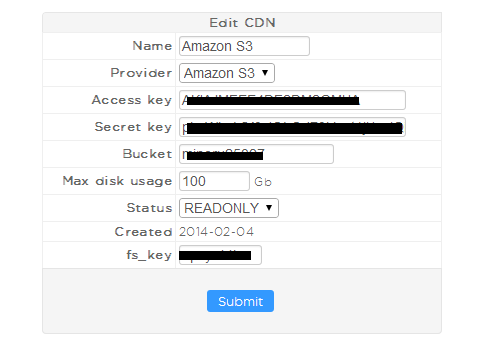
Pick a provider from the dropdown, drop in your access key, secret key, bucket and region, and the server is ready to use.
Cloud server settings
One mod, every provider
No matter which cloud storage you pick — or how many — it's all covered by this single mod. Add Amazon S3 today, mix in Backblaze and Hetzner next month, and everything keeps working through the same admin screen: same setup flow, same CDN-to-CDN transfers, same custom domains, same per-user access rules and disk quotas, for every provider you connect.